HLS, Adaptive Bitrate Streaming (ABR), and video encoding pipelines explained simply for backend engineers.
Have you ever noticed how YouTube or Netflix automatically changes video quality when your internet gets slow or fast?
One moment you're watching in 1080p, then suddenly it drops to 360p, and when the network improves, it jumps back to HD — without restarting the video.
This magic is called Adaptive Bitrate Streaming, and platforms like YouTube, Netflix, Prime Video use it at massive scale.
In this blog, we’ll break it down step by step, using simple language and diagrams.
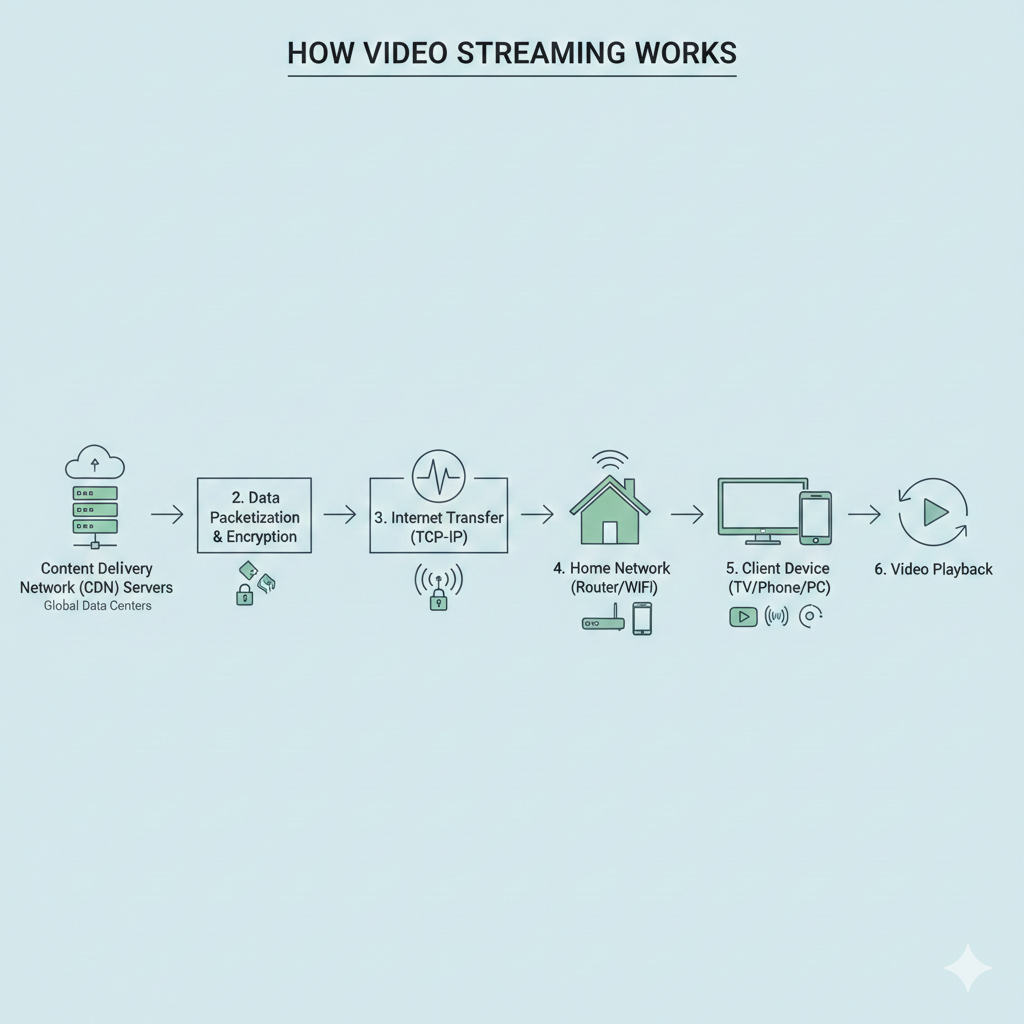
1. The Big Picture: How Video Streaming Works
At a very high level, this is what happens:
- Creator uploads a video
- Platform converts it into many qualities
- Video is split into small chunks
- A playlist is created
- CDN delivers chunks to users
- Player switches quality automatically
Overall Streaming Pipeline
2. Why Platforms Don’t Stream a Single Video File
Imagine streaming a 2 GB MP4 file directly:
❌ If internet drops → playback stops
❌ No quality switching
❌ Terrible experience on mobile networks
So instead, platforms:
- Create multiple qualities
- Split videos into small segments
- Let the player choose what to download next
This is where HLS (HTTP Live Streaming) comes in.
3. What Is HLS (HTTP Live Streaming)?
HLS is a streaming protocol invented by Apple and now used everywhere.
Instead of one big video file, HLS uses:
- Small video chunks (2–6 seconds)
- Playlist files (
.m3u8) - Normal HTTP requests (no special servers)
HLS File Structure
master.m3u8
├── 360p.m3u8
│   ├── segment1.ts
│   ├── segment2.ts
├── 720p.m3u8
│   ├── segment1.ts
│   ├── segment2.ts
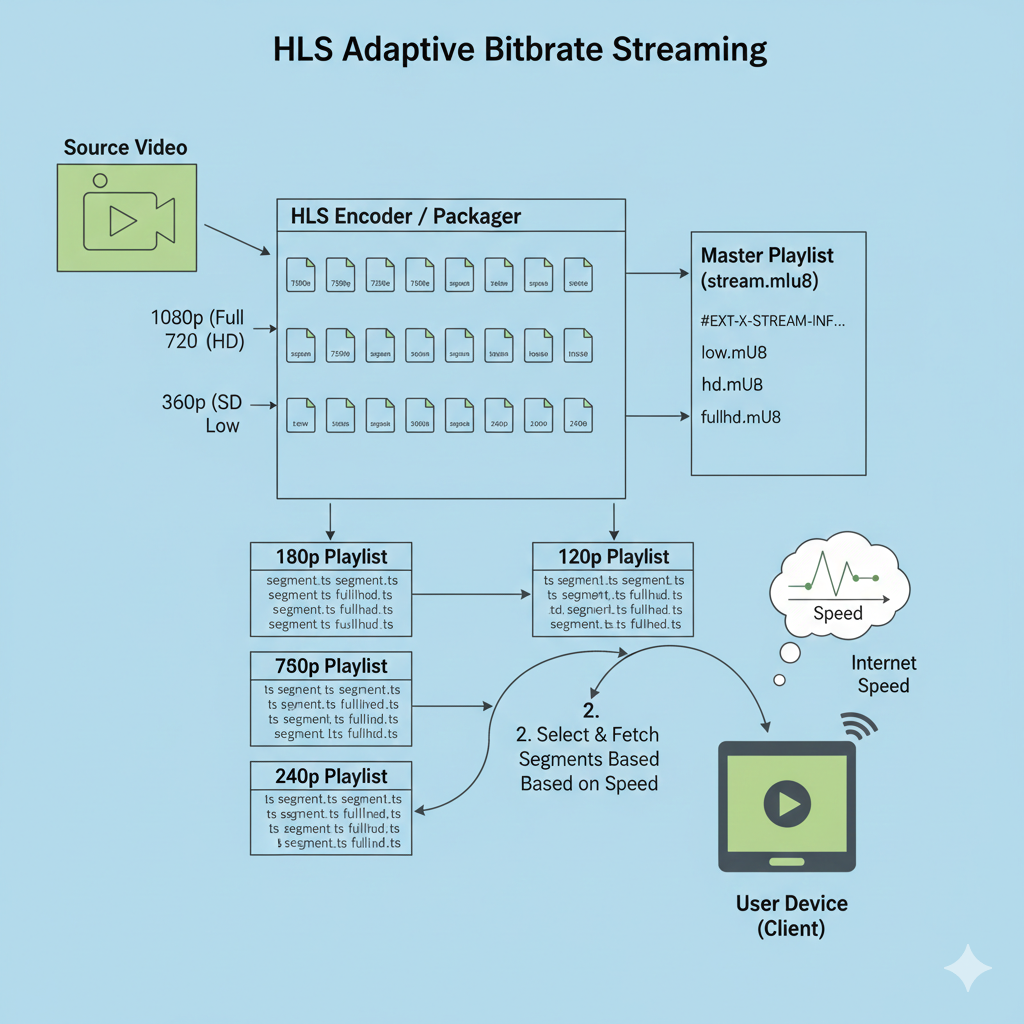
4. HLS Adaptive Bitrate Streaming (The Real Magic)
The video player continuously checks:
- Internet speed
- Buffer health
- CPU & device capability
Based on this, it decides:
“Which quality should I download next?”
Adaptive Bitrate Streaming Diagram
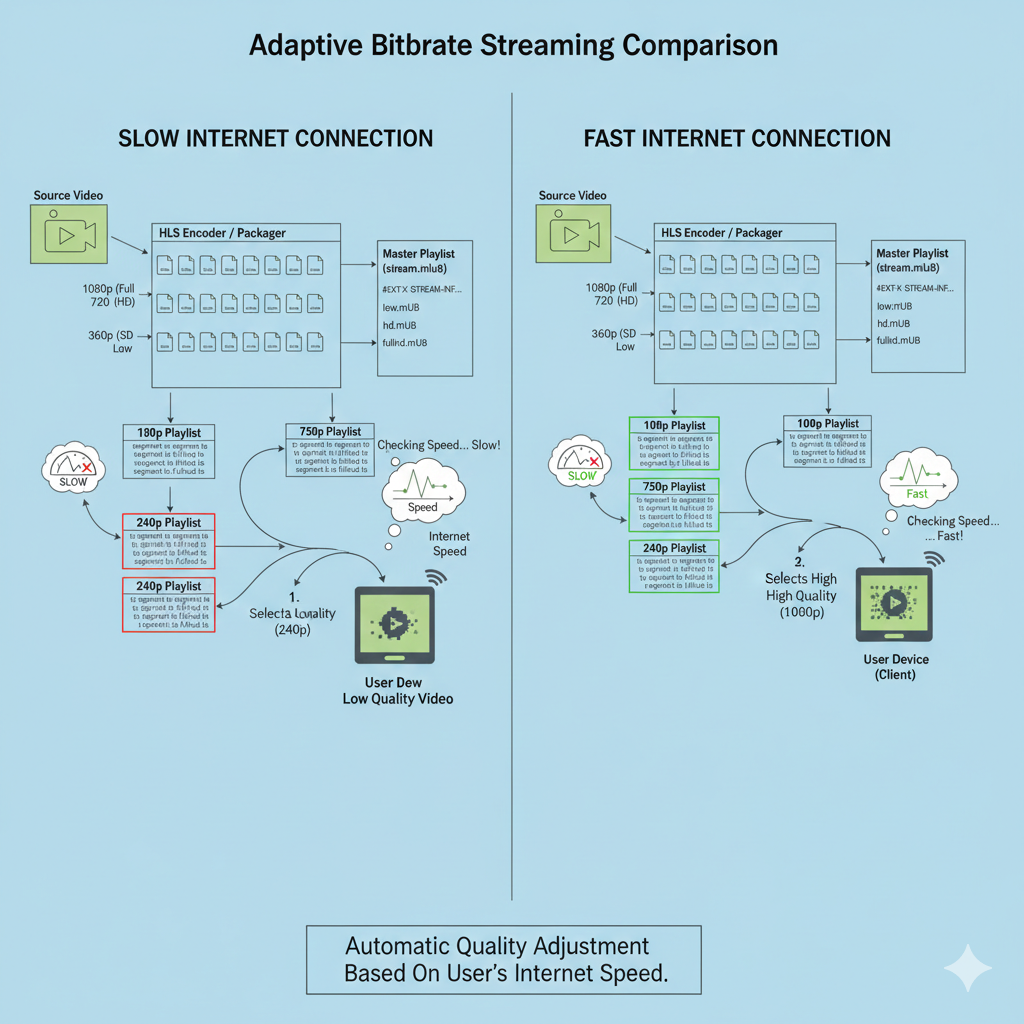
5. How Quality Switching Happens Without Reloading
This is the smartest part.
Let’s say:
- Segment duration = 4 seconds
The player does this:
Segment 1 → 720p
Segment 2 → 720p
Internet slows
Segment 3 → 360p
Segment 4 → 360p
Internet improves
Segment 5 → 1080p
Because segments are short:
- No video restart
- No user interruption
- Seamless playback
Slow vs Fast Network Example
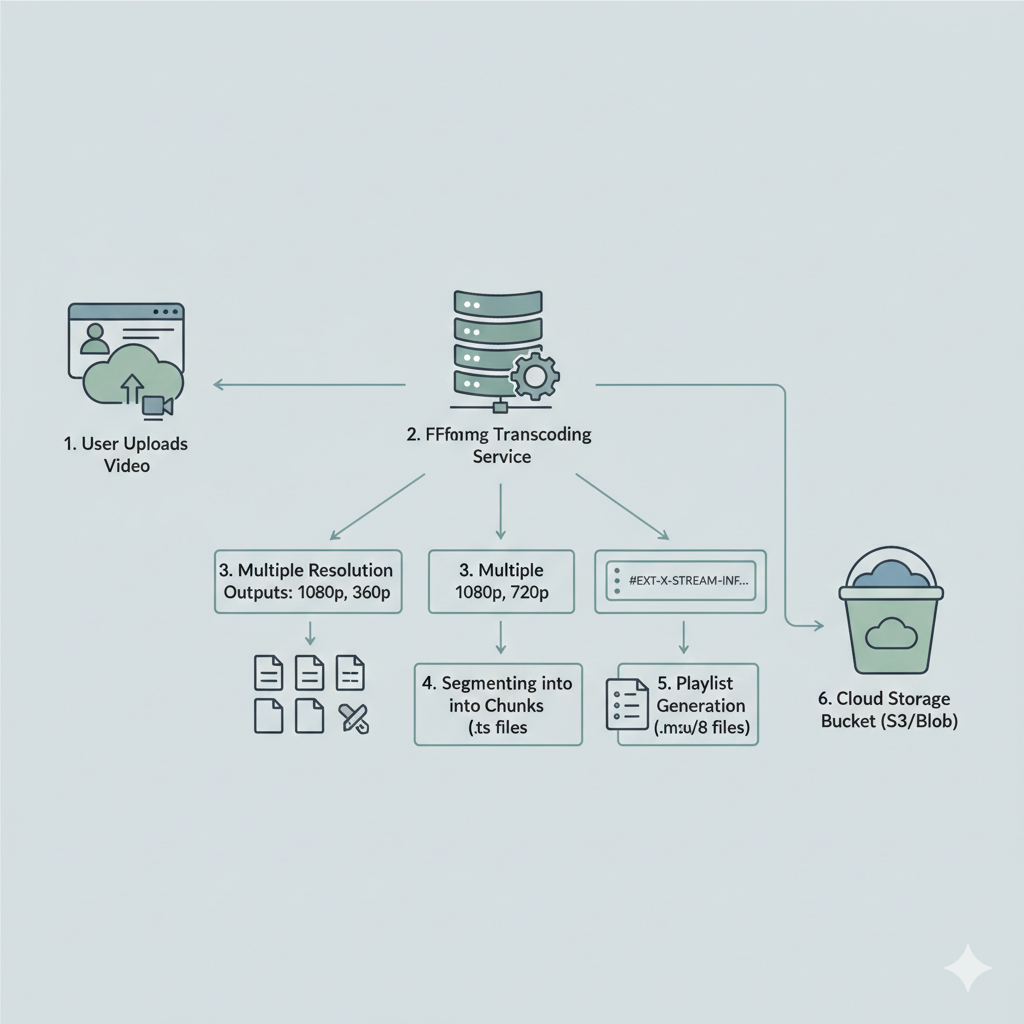
6. Behind the Scenes: Video Transcoding Pipeline
When a creator uploads a video, platforms don’t stream it directly.
Instead, they run a backend pipeline.
Typical Transcoding Steps
- Upload original video
- Convert to multiple resolutions
- Encode with different bitrates
- Split into segments
- Generate playlists
- Store in object storage
Transcoding Architecture Diagram
7. Why CDNs Are Mandatory for Streaming
Imagine one server in Mumbai serving users from India 🇮🇳, USA 🇺🇸, and Europe 🇪🇺. Latency would be horrible.
So platforms use CDNs (Content Delivery Networks).
CDN Delivery Flow
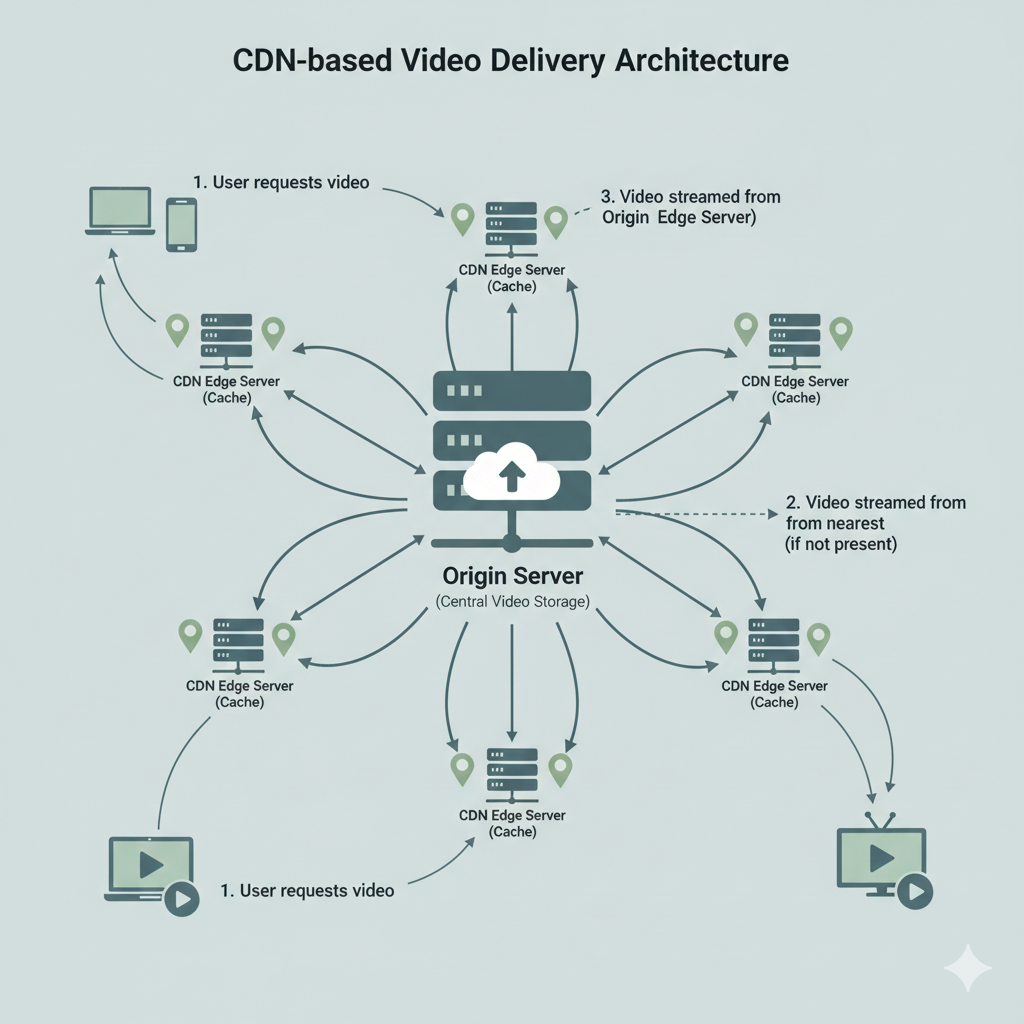
Benefits of CDN:
- Faster startup
- Less buffering
- Global scalability
- Lower server load
8. HLS vs DASH (Quick Comparison)
| Feature | HLS | DASH |
|---|---|---|
| Creator | Apple | MPEG |
| Browser Support | Universal | Modern browsers |
| Streaming Style | Adaptive | Adaptive |
| Industry Usage | Massive | Growing |
Netflix uses both, YouTube mainly uses DASH internally.
9. Why This Architecture Scales to Billions of Users
This design works because:
- Stateless segments
- Simple HTTP delivery
- CDN caching
- Client-side intelligence
- No server-side streaming sessions
That’s how:
- YouTube streams billions of hours
- Netflix handles global prime time traffic
Final Summary
Modern video streaming = smart preparation + smart playback
- Videos are preprocessed, not streamed raw
- Small segments allow adaptive quality
- Playlists guide the player
- CDN handles global delivery
- Player makes real-time decisions
Once you understand this, video streaming no longer feels like magic — it feels beautifully engineered.
Further Reading
- Apple HLS Documentation
- FFmpeg HLS Encoding
- Netflix Streaming Tech Blog